
ATS for small business and startups

An applicant tracking system sized for a small hiring team.

When one or two people run hiring alongside their day job, the ATS has to replace the spreadsheet and inbox threads without adding admin. Start with one real role.

At a glance

  • Built for one or two people who run hiring
  • Jobs, candidates, stages and next actions in one record
  • CV parsing, talent pool, interview kits and scorecards
  • Offers and onboarding checklists on the same record

Plans

Free covers a small team today

Free has no subscription fee, credit card or trial clock, for up to two operators (Admins or Recruiters) and five concurrent jobs. Basic and Growth, coming soon, add publishing, collaboration and insight when the team outgrows that.

Signs you have outgrown the spreadsheet

Move when tracking takes longer than hiring.

Small teams rarely need an ATS for its own sake. They need one when candidate details, feedback and next steps start living in too many places for the people doing the hiring to keep straight.

  1. Count the places a candidate lives

    If a CV sits in email, the status sits in a sheet and the feedback sits in chat, list them. Each extra place is a step someone has to reconcile before a decision.

  2. Check who owns the next action

    For each active candidate, ask who does what next and by when. If the answer needs a meeting, the process needs a shared record with an owner and a next action on the application.

  3. Look at interview evidence

    If decisions rest on memory rather than written notes against agreed criteria, a job-level scorecard that every interview inherits will make the decision easier to explain later.

  4. Pick one role to pilot

    Choose one opening with a known process. Set up its stages, add a few clearly labelled sample candidates, and run it end to end before moving personal data from an existing tracker.

  5. Decide with the limits in view

    Free fits up to two operators and five concurrent jobs, counting draft, open and on-hold roles. If you already need more, or need a careers page, candidate email or a hiring-manager view, plan for Basic or Growth.

What a small team gets

The core hiring record, without an implementation project.

Free is a plain applicant tracking system: the records and handoffs a small team needs to run hiring in one place, with the in-app help assistant on hand for questions about how TiLab works.

  • Jobs and applications

    Create roles, add candidates and CVs, and keep each job-specific application and its stage attached to the candidate record.

  • Candidate records and talent pool

    Keep CVs, parsed profile fields, files, notes, source labels, ownership and next actions together, and hold promising people in the talent pool for the next opening.

  • Interviews and scorecards

    Every job carries a scorecard and its interviews inherit it, so both operators record comparable ratings and written evidence.

  • Offers and onboarding

    Route offer approvals, build the offer, and track onboarding checklists on the same hiring record once you have chosen someone.

Fit in plain language

Where a small-team ATS fits, and where it stops.

The right ATS for a small business is the one the people doing the hiring will keep up to date. Judge TiLab on what it supports today, not on what the paid plans will add.

A good fit when

A founder, operations lead or first recruiter runs hiring with one other person.

  • One or two people own applications, communication and decisions
  • No more than five roles are in draft, open or on hold at once
  • You want interview evidence written down against the role
  • You want one record from application to onboarding checklist
Plan for a paid plan when

These capabilities are not part of Free. Basic and Growth are coming soon.

  • A third operator or a sixth concurrent job
  • Careers page publishing or the MCP connector (Basic and Growth)
  • Hiring Manager and Candidate portals, candidate email and scheduling (Growth)
  • Analytics, referrals and case-study assignments (Growth)
  • AI features beyond the help assistant, including the optional AI Studio add-on for Growth

Common questions

Questions small teams ask before switching.

Is an ATS worth it for a handful of hires a year?

It depends on how many places the hiring currently lives. If one person can find every candidate’s status and feedback in one sheet, keep the sheet. If two people keep reconciling email, chat and a tracker, a shared record is worth testing on one role.

Is this different from the free ATS page?

The free page explains the Free plan and its limits. This page is about fit: whether a small team’s workload and roles suit a two-operator, five-job workspace, and how to test that on one role.

Does it work for a startup?

Yes, when hiring is run by a founder and one other operator. On Free, seats are for Admins and Recruiters; the Hiring Manager portal, which gives managers their own shortlist and feedback view, is part of Growth.

What happens when we grow past Free?

Basic removes the concurrent-job cap and is billed per operator; Growth adds the Hiring Manager and Candidate portals, candidate communications and analytics. Both are coming soon. See the pricing page for the current plans.

Can we bring our existing spreadsheet?

Plan the move first. The free spreadsheet-to-ATS migration kit helps you map columns, clean records and pilot one role before importing personal data.

A worked evaluation

Pilot one role in a small team.

A fictional twelve-person company is hiring its first Customer Success Associate. The founder and the operations lead share hiring. Candidate A, Candidate B and Candidate C are synthetic records; no customer results are implied.

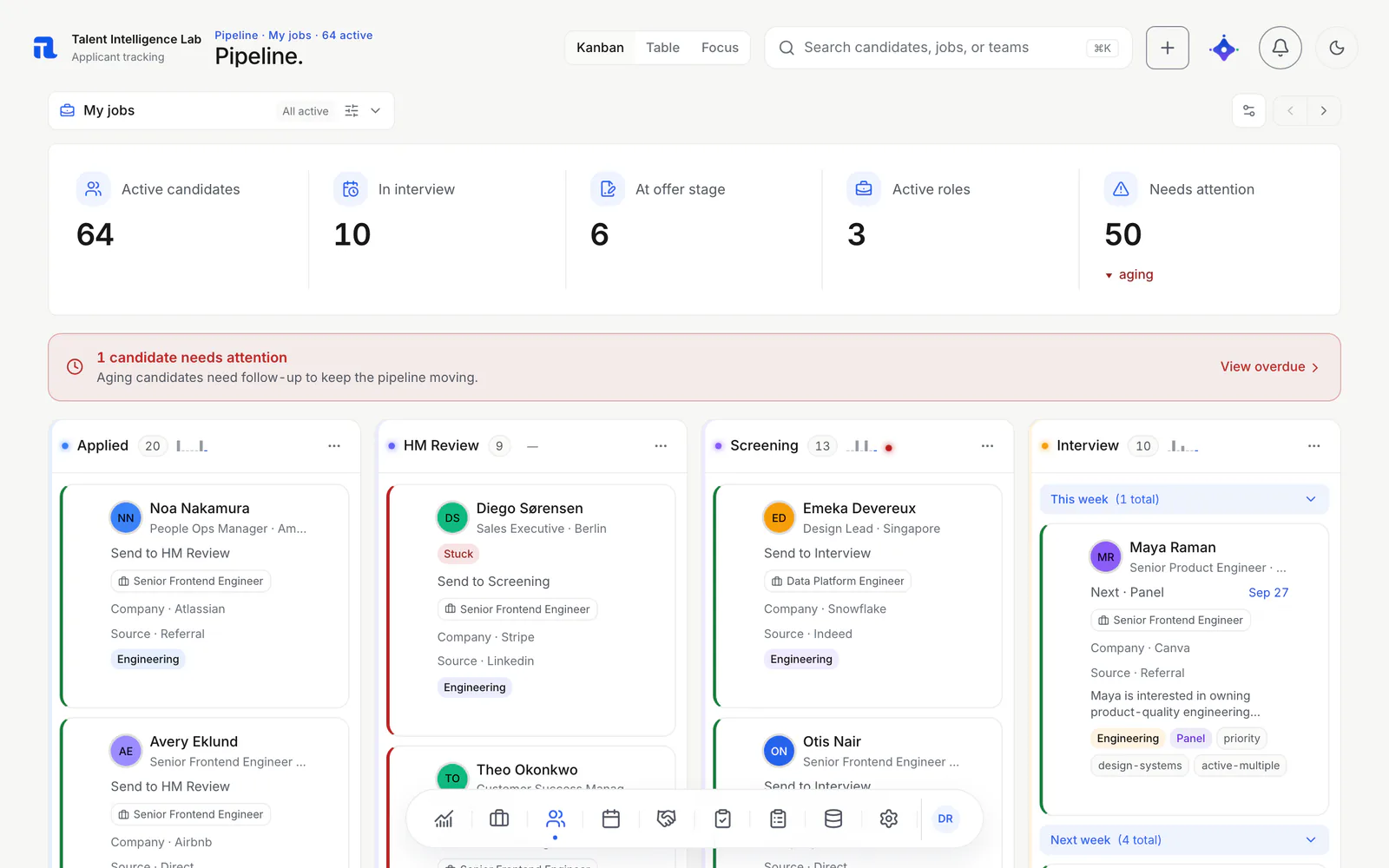
TiLab candidate pipeline in Kanban view, with Applied, HM Review, Screening and Interview columns of synthetic candidates.
TiLab pipeline, captured September 2026 from a synthetic demo workspace. Names, companies and totals are illustrative, not customer results.
  • Write down today’s process

    List where CVs arrive, where status is tracked and where interview notes go. Pick three tasks to compare: finding a candidate’s status, naming the next action, and reading the reason for a decision.

  • Run the role in the workspace

    Create the job with its stages, add the three sample candidates, move each through the pipeline and record a short scorecard from both operators.

  • Compare and decide

    Repeat the three tasks using only the workspace. Record anything you needed that Free does not include as a gap, and check it against the plan limits before moving more roles.

The pilot passes when both people can run the role, explain each candidate’s status and decision from the record alone, and accept the Free limits. Keep the original spreadsheet until the pilot is finished.

Explore the workflow

Continue with a related guide.

Create a free workspace for up to two operators and five concurrent jobs, and compare it with the way your team hires today. When you need publishing, collaboration or insight, Basic and Growth are coming soon.

Contact the team

Run one role before you move the rest.

Create a free workspace